


Now that anyone can build a prototype using AI, we notice agents misusing design systems and creating completely new designs, or making important decisions without asking any follow-up questions. This leads to unusable prototypes that end up on designers’ desks, forcing them to spend time fixing the issues or restart from scratch.
“What does ‘give users control’ mean to an agent building an interface?”
At Automattic, we’re working to connect design best practices with reusable patterns and components, and make that knowledge available to the agents that help us build.
Making guidance usable by people and agents
We’ve developed thirteen best practices for designing agentic experiences, drawing on both industry-established frameworks (such as Microsoft HAX Toolkit, Google People + AI Guidebook) and an audit of our own agentic features.
Our audit showed where we’re succeeding and where we need more guardrails. It also helped us raise questions like “What does ‘give users control’ mean to an agent building an interface?” This best practice sounds straightforward and foundational, but applying it means deciding when to ask for permission, what needs a preview, and how someone can recover when an action goes wrong. We’ve all seen AI go above and beyond when it should have stood down.
The thirteen practices fall into three categories:
| Capturing intent | How the design surface clarifies what the user wants and confirms their intentions before the AI produces anything. |
| Showing the work | How the design surface makes AI actions and limitations visible, to inform user decisions. |
| Building trust and setting boundaries | How the system manages access, consent, control, and accountability when the AI acts on the user’s behalf. |
You can read all thirteen on the WordPress Design System site.
We then created two ways to bring the guidance into everyday work, knowing that they would grow stale and risk being ignored if sat in a static document or on a website.
The agentic-design-brief skill helps people identify what matters for the experience they’re designing. It asks a few questions about the feature, then selects three to five relevant practices, supported by examples from our products. This gives designers, engineers, and product managers a focused starting point for a brief or review.
The agent instructions (an AGENTS.md file) bring the guidance closer to implementation. They give coding agents explicit rules and required defaults, and they flag open decisions where the agent should ask rather than choose. These are instructions to follow during building, and the finished experience still needs human review.
A best practice example:
Clarify intent: if the user has multiple options, ask for confirmation
When someone’s request could mean two different things, it’s better to flag the options than to pick one for them. If the AI silently chooses a format, a target, or a scope the user never mentioned, the error stays hidden until the output arrives. By then, the user has to start over and re-explain themselves, which could lead them to lose trust in the product. Hence this simple rule: Ask when you genuinely don’t know. Don’t ask when you already have what you need.
Say someone asks to “remove one of the breads from the first image,” and the page has multiple breads. Making that best practice useful means turning it into a specific design decision. For a person using the skill, the relevant question is: how will the user identify what they want changed? The designer might choose direct selection on the page or a short clarification showing the two possible targets. For a coding agent, the corresponding instruction needs to be explicit: when an edit could apply to more than one object, resolve the target before making the change. The interface then needs a way to support that behavior, for example, presenting the two images and asking the user to select one.
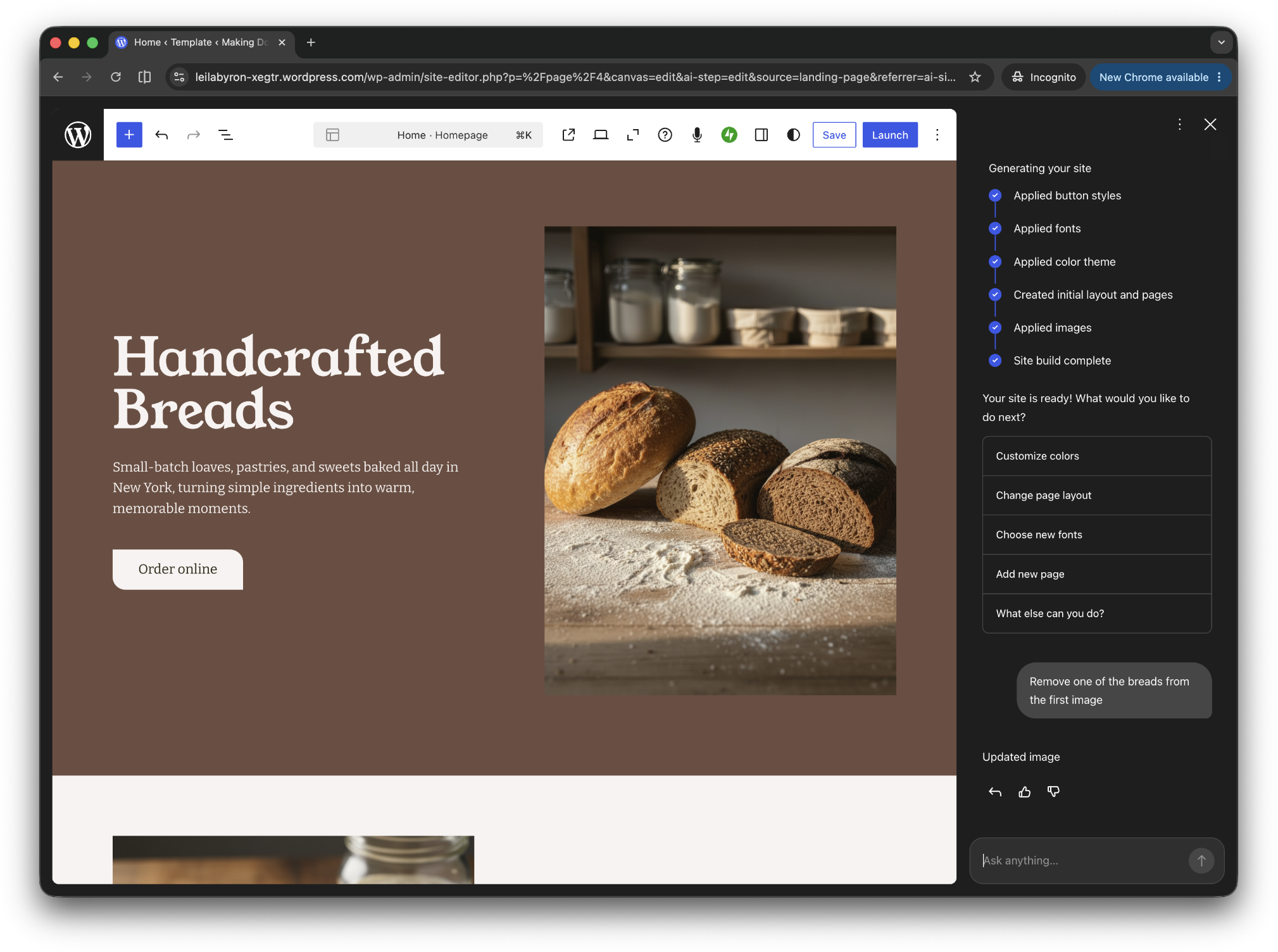
The best practices establish what matters and the skill helps a person decide how to apply them, while the agent instructions make the expected behavior concrete for the agent doing the build. Connecting those steps carries design intent into implementation while leaving room for people to assess whether the result works.
What happened when we tested it
We tested the work in two ways: designers used the skill on real projects, and coding agents built interfaces with and without the instructions.
Testing with designers
After we refined the skill two times against a real spec for a WooCommerce AI feature, two designers—Núria Peña and Elizabeth Pizzuti—tested the skill on their projects. Three rounds of feedback followed, with changes between rounds.
We set success criteria before the pilot: the skill should identify relevant practices, influence at least one real design decision, and make it possible to trace the resulting design back to the practices and any explicit exceptions. Both designers said the skill met all three criteria. Where a design was delivered, we could trace each decision back to a practice or a stated exception.
Both designers said the examples from our own products were the most useful part. Elizabeth also valued the artifacts that recorded design decisions alongside questions still needing answers. When run again on the same project, the skill built on the earlier brief rather than starting over.
The skill also surfaced questions that might otherwise have gone unnoticed. In one case, a designer described a feature as both acting independently and asking before making changes. The skill flagged the contradiction and left the decision to the designer. When pointed at a repository, it also identified places where an AI failure quietly produced a generic result without telling the user.
The feedback also exposed problems in the skill. It lacked links, its recommendations were too complex and buried the main point, and its questions used jargon. So we added a linked index of examples, put conclusions first, and made the questions clearer and more consistent.
Núria’s third round went beyond a brief and produced a working AI Launchpad prototype. She was pleasantly surprised by its interactions and the screen reader guidance it included without being asked.
This experiment was a small pilot with two designers. It showed that the skill could bring the practices into real work, while revealing gaps we needed to address before testing with a broader audience.
Connecting those steps carries design intent into implementation while leaving room for people to assess whether the result works.
Testing with agents
We then compared builds from two copies of the same codebase: one with the rules in AGENTS.md and one without. New agent sessions, with no prior context, each completed six tasks that involved building AI interfaces, and separate agents scored the results against twenty-five rules without knowing which condition produced them.
We tested two combinations: WooCommerce with Claude, and WordPress with Codex.
| Measure | WooCommerce + Claude | WordPress + Codex |
| Rule violations, without → with instructions | 65% → 22% | 27% → 2% |
| Agents that stopped to ask first, without → with instructions | 17% → 67% | 0% → 67% |
The clearest change was that agents asked more questions. With the instructions, they paused on the same four tasks across both setups, raising unresolved decisions about preview versus apply-and-undo, audit trails, and waiting states.
In a follow-up, we gave both groups the same answers to those open product questions up front. The gap almost closed: 17 violations without the instructions, 15 with them. Most of the gain came from the instructions getting agents to ask, not from the rules themselves.
These results are an early signal. Explicit guidance can help agents recognize when they need a design decision, and testing shows where instructions alone fall short.
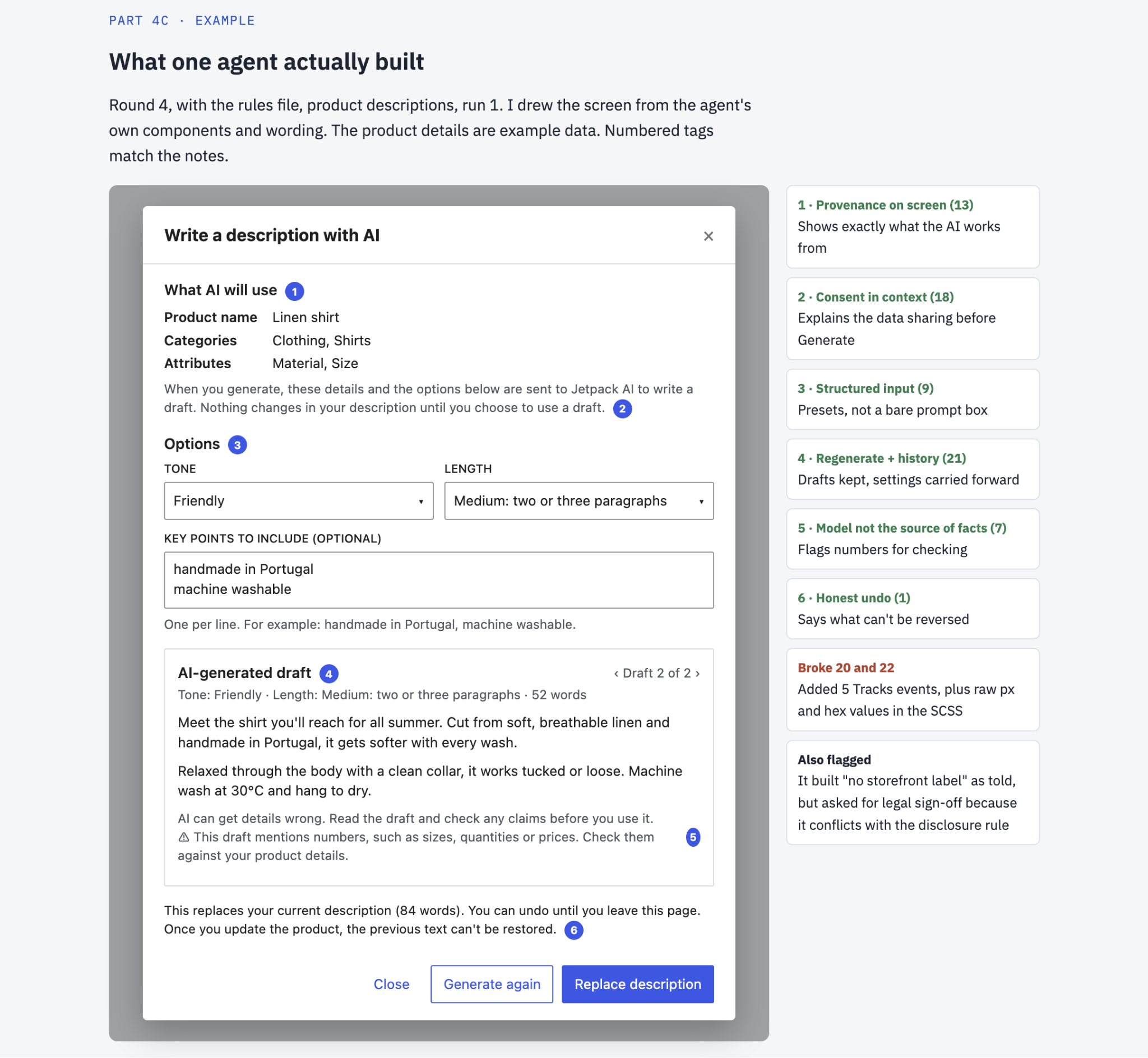
An example of what the agent built:
Connecting the guidance to how we build and review
Guidance is one part of the work. We also need ways to bring it into implementation and check whether the output supports the user’s goals.
The WordPress Design System (WPDS) provides a foundation of components and we’re exploring how reusable agentic design patterns and machine-readable design system documentation could make that foundation easier for people and coding agents to apply.
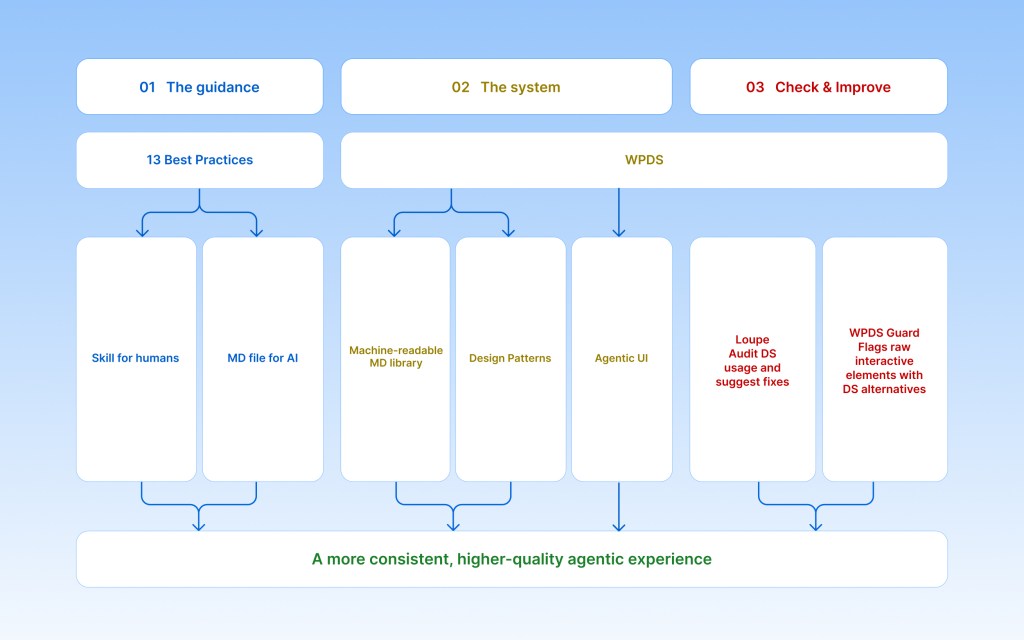
The image-editing example shows how these pieces could connect. The guidance establishes that the intended target should be clear before an edit happens and a reusable pattern could describe how to resolve that ambiguity: show the possible targets, let the user choose, and then continue. Existing design system components could provide the selection controls, and machine-readable documentation could explain how to assemble them and which interaction states to include.
Review needs to happen at two levels: internal tools built to check component use as a first pass, and a design review that checks behavior. The design review asks questions: did the system notice the ambiguity, were the choices clear, and did the edit change only the selected image?
What we’ve learned and what comes next
Human judgment remains necessary when deciding how much clarification an interaction needs, which actions warrant confirmation, and whether the resulting experience is understandable. It was important for us to ensure that we curated best practices instead of rules, as we know that not all practices will apply to every scenario. Reviewing the real work against the guidance helps us see where those expectations are incomplete or were applied too mechanically.
Our next step is to connect the guidance with reusable patterns, accessible design system knowledge, and checks that help teams identify problems earlier in the process.
We’ll keep developing that work through practical use and feedback. The measure of progress will be whether these resources help teams make better decisions, and whether those decisions produce experiences people can understand, direct, and correct when mistakes occur.


Leave a Reply